
Current zenon version
zenon 16 prepares you for the future of industrial automation!
Significant resources have been invested in numerous improvements to usability, connectivity, and security. But in addition to these ongoing enhancements in zenon, version 16 introduces new, forward-looking technologies: MTP 2.0, biometric user authentication using the IIoT Services, and numerous new capabilities in the Web Visualization Service are just a few of the highlights.
You are also welcome to get in touch with your local contact person.
Release Notes
The highlights mentioned here are only an excerpt of what zenon 16 has to offer. Please refer to the detailed release notes for the complete list of new features.
Fast Facts: The most important innovations for ...
-
Energy & Infrastructure
- New IEC 61850 Driver Configuration Wizard
- Further enhancements for Linux based projects
- Adaptions for compliance with IEC 61850 Edition 2.1
- Further enhancements in the direction of virtualization (vPAC)

-
Life Sciences & Pharmaceutical
-
Improvements to the MSI interface
-
Web Visualization Service now offers eSignature, PFC batch recipes, and much more
-
Orchestration Studio supports MTP 2.0
-
Biometric identification with zenon IIoT Services (FIDO2 standard)
-
-
Food & Beverage, Sustainability Solutions
-
Numerous new features and usability improvements in alarm management
-
AVEVA PI Connector
-
Enhancements in Web Visualization Service
-
What’s new in zenon Service Engine?
The zenon Service Engine has been enhanced with several new features that bring greater usability, improved transparency, and higher interoperability to your projects:
-
Changes to Service Engine files (e.g., Alarm Message List, Chronological Event List, or batch recipes) made outside the Service Engine are clearly displayed to ensure data integrity.
-
Data from AVEVA PI can be loaded into zenon and used there as historical data in the Service Engine and the Report Engine.
-
Features such as extended shelving times for alarms offer greater usability and flexibility. Additionally, the ability to export only filtered data from AML/CEL filters enhances user-friendliness.
Improved usability in zenon Batch Control
In zenon Batch Control, significant effort has been invested in improving usability. Units and phases (as defined in ISA 88) can now be selected and configured more easily. In addition, values (e.g. temperature) are now displayed directly on the phase or transition without having to navigate to additional detail views. The new “Static Text” element is available in batch recipes for further descriptions. This helps operators better understand recipes and the associated process.
What new features does Orchestration Studio offer?
With zenon 16, Orchestration Studio supports MTP 2.0 (Module Type Package 2.0). But it’s not just the associated features that further enhance Orchestration Studio.
In addition to the already available TIA Process Library, new Process Libraries for Rockwell and Mitsubishi are now available.
Engineering in Orchestration Studio becomes easier and faster
A complete MTP file can be automatically and easily generated from an OpenDCS project. The file created in this way can be shared directly with customers or project partners, significantly simplifying the exchange of modules and engineering data – especially for component manufacturers such as machine builders. This reduces engineering time, minimizes sources of error, and ensures a consistent, more efficient engineering process.
The newly added ability to import and export Excel files makes Orchestration Studio easier to use – manually updating changes is no longer necessary.
Already familiar from zenon Batch Control and now available in Orchestration Studio are Batch Unit Classes. These make it possible to run multiple recipes on multiple machines of the same type.
Another usability improvement is the ability to assign “more readable” names to variables, making it easier to navigate the zenon project.
Performance improvements through integration projects
A feature that has long been familiar to engineering in zenon is the integration project. Integration projects can now also be created in Orchestration Studio to divide the project up into multiple service engines, thereby distributing the computational load and resulting in a significant performance improvement.
Innovations within zenon IIoT Services
With zenon 16, the IIoT Services offer many usability improvements through numerous redesigns, such as in the Identity Service – which now features a consistent look and feel – and in the Device Agent. Of course, investments were once again made in developments that ensure up-to-date security. In addition, zenon 16 paves the way for an even more robust and scalable system with IIoT Services.
In addition, both the Service Engine and zenon IIoT Services can now be offered as white-labeled versions to OEM customers.
Biometric identification using IIoT Services
In combination with the Identity Service from zenon IIoT Services, zenon enables the identification of operators using biometric characteristics. This solution adheres to the FIDO2 standard, positioning COPA-DATA as a pioneer in this field within the automation sector. For example, projects have already been implemented using Nymi wristbands, which are well-known in the pharmaceutical and life sciences industries, for registration at machines. Other options, such as facial recognition for user authentication or NFC access systems in building management, can also be implemented.
Greater traceability of processes in IIoT Services
A central notification service immediately provides users with more information about what happened in the IIoT Services and when. For example, successful or failed deployments, too many login attempts, etc., are displayed in the notifications.
An Events and Audit Journal records all operations in detail whenever system changes are made and also supports multiple languages.
New features in Web Visualization Service
The features of Web Visualization Service (WVS) have been significantly expanded in zenon 16. Numerous additional zenon features, already familiar from the Service Engine, are now also available in the WVS
- It is particularly worth noting that WVS supports eSignature, which enables complete traceability.
- zenon Logic can now also be used on the client. This makes it possible to carry out minor programming tasks, for example required for certain calculations on the machine.
- Many additional elements and display options are now also available in WVS, such as the clock element, dynamic variable limits, sliders, modal dialogs, unit conversion, and much more. With the ability to embed HTML screens, PDFs, for example, can be displayed on the WVS screen.
- The ability to visualize interlocked elements and the use of individual filter screens for the Alarm Message List, the Chronological Event List, and the Trend make managing projects more user-friendly.
- The recipe list from the Recipe Group Manager can now be displayed in WVS.
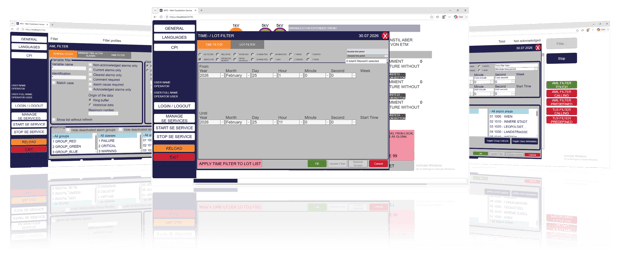
Displaying PFC recipes for more options with Batch Control in WVS
In addition to the Matrix recipes which are already available, PFC (Procedure Function Chart) recipes from Batch Control can now also be displayed in the Web Visualization Service. This allows for clear tracking of recipe execution. Commands for phases and recipes (such as Start, Pause, Resume, etc.) are also supported.
Performance improvements for projects with many clients
An important new feature in the Web Visualization Service related to performance is the ability to configure preloaded instances. This allows you to specify how many instances are started in advance and kept ready. Whereas previously only one instance was preloaded by default, the number can now be flexibly adjusted to meet the requirements of your environment. This reduces login time for users and improves system performance, especially when many clients log in simultaneously. This is particularly beneficial for larger projects.
Enhanced Security in the Web Visualization Service
Identity Service login is supported in WVS and provides greater security and control over user permissions within the project.

What new features does zenon 16 offer in engineering?
Equipment Model based access control in engineering
With access control based on the zenon Equipment Model, users are granted access only to the system components for which they are authorized. This means that relevant changes can be made only with the appropriate authorization, provided that the user's data matches the respective Equipment Model and access level.
Different user groups have individually defined permissions. This significantly improves user management in engineering and the Service Engine and ensures greater security as well as a clear division of roles – a feature that is particularly important in the pharmaceutical industry.
Another possible scenario: For security reasons, various engineering tasks require access directly at the machine. This ensures that changes are made in a controlled manner and in the proper context.
All changes made to the project are documented in a transparent manner and can be traced at any time. This facilitates collaboration among multiple project participants and significantly improves the management of complex engineering projects.
New Smart Object features
The Smart Object instantiation mode allows you to customize and flexibly define how variables and functions are instantiated. Depending on your requirements, all instances can access a shared variable, or a separate variable can be created for each instance.
Comprehensive performance improvements related to Smart Objects result in significant time savings when configuring and updating Smart Objects. Wizards that use Smart Objects also benefit from these improvements.
In addition, the Notepad screen type is available for Smart Objects in zenon 16.
Additional engineering innovations:
- Active Directory login in Engineering Studio reduces the number of different user management sources required.
- Regarding Automatic Line Coloring (ALC): “Secure connections” can be disabled when not needed.
- Meta Data Synchronizer handles larger data volumes for more seamless synchronization of data in the IIoT services.
zenon 16 and Linux
With zenon 16, implementing zenon projects that run on Linux is becoming increasingly easier and more user-friendly, for example through the ability to create file overwrites. Project changes can now also be deployed to recipients running Linux via Remote Transport.
Projects in zenon networks running on Linux now also benefit from zenon’s comprehensive redundancy capabilities.
In addition, zenon 16 now supports the ICCP Process Gateway on Linux.

How will connectivity be further enhanced with zenon 16?
As with every release, zenon's connectivity is a key factor in product development:
- What needs to be programmed in other systems is already available out of the box in zenon 16: If the Service Engine starts or stops, zenon Logic continues to buffer essential values. In particular, projects in the fields of energy management and building automation benefit from this.
- Starting with version 16, zenon offers support for TIA 21.
- PVI 6 is also supported starting with zenon 16.
- Further, BacNetNGs Secure Connect is supported.
- Support for OpenSSL 3.5 and support for PQC (post-quantum cryptography) for future-proof cybersecurity.
- The new MQTT Publisher Gateway enables efficient transmission of payloads via MQTT. Communication follows the Sparkplug B specification for topics and payloads, ensuring standardized and interoperable data transmission. A predefined JSON definition is available for the payload structure, which can be flexibly adapted to individual requirements as needed.
The updates to IEC 61850 are particularly relevant for projects in the Energy & Infrastructure industry:
- zenon 16 complies with IEC 61850 Ed. 2.1.
- A configurable storage limit for buffered reports makes the system more robust.
- The new IEC 61850 Configurator replaces the 61850DriverConfiguration Wizard and the 61850SSD Import Wizard.
Here, we highlight just a few of the many new connectivity features. For more details, please refer to the release notes.
These are the enhancements to the MSI interface you can expect
The MSI interface in zenon 16 offers numerous usability enhancements. Overall, usability when handling messages and exceptions has been improved. In addition, all new message types from the Material Flow category are supported in accordance with the MSI specifications V1.4. Furthermore, it is now possible to use the zenon Language Table for translating texts to be sent.
The MSI interface can now be configured directly in Engineering Studio, and the configuration is included in the project backup. The interface can be deployed to all Service Engine instances via Remote Transport. Using the MSI Interface Configurator, you can define on which devices the interface is launched.
The Batch Control integration enables PAS-X messages to create a control recipe in the Batch Control module and start it automatically.
Take a look at zenon 16 now!
Get a look at the newest version zenon 16 and its brand-new features.
Lift your zenon Basic Certificate to the next level - zenon 16.